

High-Quality Video Collaboration for Small Rooms, Focus Spaces, and Hybrid Desks
Hayley Spooner, Mar 16, 2026

Modern workplaces rely on small, flexible spaces for focused work and quick video meetings. Personal offices, focus rooms, phone booths, hot-desking areas, and compact huddle spaces all require collaboration technology that works reliably at close range without adding complexity or clutter. This page explains how high-quality video collaboration can be designed specifically for these environments and how Neat Board 32 supports these use cases as an all-in-one device.
On this page, you will learn:
- What small-space collaboration hubs are and how they differ from traditional meeting rooms.
- The technical requirements for exceptional small-room video, including display quality, audio performance, and interaction.
- How Neat Board 32 integrates display, camera, microphones, speakers, and touch collaboration into a single device.
- Example deployment templates for desks, focus rooms, phone booths, hot-desking zones, and small meeting spaces.
- Why visual and audio quality matter more in compact environments where users sit close to the device.
- A practical implementation checklist for deploying video collaboration across many small spaces.
- Answers to common questions about using Neat Board 32 in small rooms and desks.
What are small-space collaboration hubs?
Small-space collaboration hubs are compact work areas designed for individual or small-group communication using video conferencing and other digital collaboration tools. They typically support one or two people at a time and are used for quick meetings, calls, or focused work rather than larger group sessions. Examples include focus rooms, acoustic phone booths, hot-desking zones, and personal offices that have been equipped for remote or hybrid collaboration.
These spaces are usually defined by tight physical constraints. Floor area is limited, often accommodating only a desk, a chair, and minimal equipment. Because they are frequently located near open-plan work areas, they must also provide a degree of privacy and sound isolation to prevent conversations from disturbing nearby colleagues or being overheard. Many organizations also require these spaces to be easy to deploy and maintain, which means equipment must be quick to install, simple to operate, and capable of working reliably without extensive setup.
Traditional meeting-room systems are often poorly suited to these environments. Many are designed for larger rooms and assume longer camera distances, wider seating arrangements, and more complex equipment layouts. In small spaces, camera angles can become awkward, microphones may capture excessive room noise or echo, and the hardware itself can take up valuable desk or wall space. At the other extreme, relying only on a laptop for video calls can create different limitations, such as narrow camera framing, inconsistent audio quality, and uncomfortable viewing angles. The result is often a cluttered workspace and a less effective collaboration experience.
Requirements for exceptional small-room video
Small collaboration spaces place different demands on video systems than larger conference rooms. Equipment must work effectively at short distances, operate with minimal setup, and avoid adding clutter to already limited work areas. The following criteria describe the core technical requirements typically associated with effective small-room video collaboration.
Example implementation: Neat Board 32
The following table shows how Neat Board 32 aligns with these requirements for small-space collaboration environments.
| Requirement area | Small-room criteria | How Neat Board 32 addresses requirements |
|---|---|---|
| Visuals | 4K display, wide field of view, anti-glare surface, clear close-range framing. | Neat Board 32 provides a 4K interactive display designed for close viewing distances, combined with a wide-angle camera (~140°) that keeps users in frame even when seated close to the screen. The display surface reduces glare in bright office environments. |
| Audio | Beamforming microphones, wide pickup, noise reduction. | Integrated beamforming microphone arrays capture voices from across a small room while filtering background noise. Built-in speakers deliver balanced audio suitable for short-distance listening. |
| Interaction | Touch, whiteboarding, active pen, low latency. | The device supports multi-touch interaction, digital whiteboarding, and active pen input, enabling users to annotate, sketch, and collaborate directly on the screen with minimal input delay. |
| Deployment | Single-cable USB mode, minimal gear, simple mounting. | Neat Board 32 supports single-cable USB connectivity for laptop meetings and integrates camera, microphones, speakers, and display into one device. This reduces external equipment and simplifies installation in focus rooms, booths, or small offices. |
In small collaboration spaces, integrating display, camera, audio, and interaction into a single device reduces complexity while maintaining consistent video and audio quality. Systems designed specifically for close-range use are more likely to deliver reliable results than equipment intended primarily for larger conference rooms.
Neat’s approach to small spaces
Designing video systems for compact work areas requires a different approach than scaling down equipment built for conference rooms. Devices must function well at close range, fit comfortably within limited physical space, and reduce the number of separate components required to support video meetings and collaboration.
Neat’s approach to small environments focuses on integrating core capabilities—display, camera, microphones, speakers, and interaction—into a single device that can operate effectively in focus rooms, phone booths, and personal desks.
All-in-one for focus spaces and desks
Neat Board 32 is designed specifically for compact workspaces where one or two people need immediate access to video collaboration tools without the complexity of a traditional room system.
The system combines several components commonly required for video collaboration into a single integrated unit:
- 4K capacitive touchscreen display designed for close viewing distances and direct interaction.
- 140° horizontal field-of-view camera, allowing participants seated near the display to remain clearly framed.
- Four beamforming microphones to capture speech while reducing background noise.
- Full-range speaker driver with passive radiators, providing clear audio playback in small rooms.
By integrating these elements into one device, the system reduces the need for external cameras, microphones, or speakers. This simplifies deployment in spaces where desk area, mounting options, and cable management are limited, while still supporting video meetings, whiteboarding, and interactive collaboration.
Versatile mounting and ergonomics
Small collaboration spaces vary widely in layout. A focus room may require a wall-mounted display, while a hot desk or personal office may need a device that sits directly on a table or attaches to the edge of a desk. Because of this variation, mounting flexibility and ergonomic adjustment are important considerations when deploying collaboration devices in compact environments.
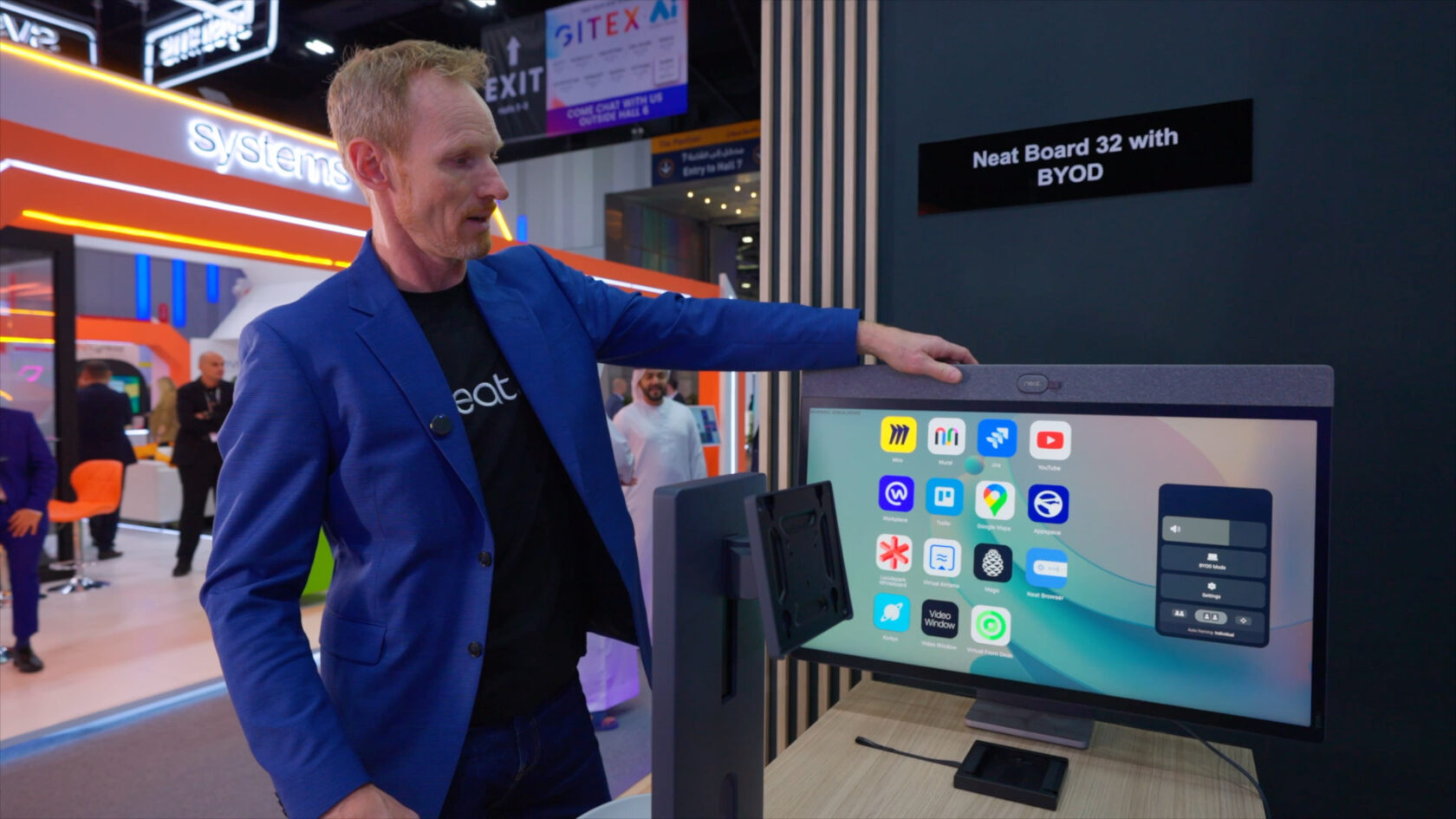
Neat Board 32 supports multiple mounting options and adjustable positioning so the device can adapt to different workspace configurations. These options allow the screen to function either as a personal desk display positioned close to the user or as a shared front-of-room screen in a small meeting space.
| Mounting option | Description | Typical use case |
|---|---|---|
| Table stand | Freestanding support that places the display on a desk or table surface. | Personal offices, hot desks, or small focus rooms where wall mounting is not practical. |
| Table clamp | Secure clamp that attaches the device to the edge of a desk or workstation. | Compact desks where surface space is limited or where a more fixed installation is preferred. |
| Wall mount | Fixed wall installation that positions the display at eye level. | Focus rooms, phone booths, or small collaboration rooms used by multiple people. |
| VESA mount compatibility | Support for standard VESA mounting patterns. | Integration with third-party arms, stands, or adjustable mounting systems. |
In addition to these mounting choices, the device supports adjustable height, tilt, and swivel, allowing users to position the display for comfortable viewing and camera alignment. This flexibility helps maintain appropriate camera framing and viewing angles whether a single person is seated close to the screen or two participants are positioned slightly farther away.
Because of this adaptability, the same device can be deployed in multiple scenarios – from a personal collaboration display at a desk to a shared screen at the front of a small meeting space – without requiring different hardware for each environment.
Use cases and room templates
Personal offices and executive desks
In personal offices and executive workspaces, a collaboration display often serves both as a primary work screen and as a video meeting surface. In this configuration, Neat Board 32 can function as a 32-inch 4K display connected to a laptop via USB-C while also providing integrated video conferencing capabilities.
Because the device integrates camera, microphones, speakers, and touch interaction, it can replace several separate peripherals typically found on an executive desk.
| Component | Setup |
|---|---|
| Display role | Neat Board 32 used as a primary or secondary 32″ 4K monitor. |
| Connection | USB-C docking connection to laptop. |
| Video hardware | Built-in camera, microphones, and speakers. |
| Interaction | Touch and active pen for annotation and whiteboarding. |
Example use cases
- Single-cable laptop connection for display, video, and audio.
- Laptop charging through USB-C while connected.
- Whiteboarding during 1:1 meetings directly on the screen.
- Quick transition between desk work and scheduled video meetings.
Focus rooms and phone booths
Focus rooms and acoustic phone booths are designed for short meetings or private calls involving one or two people. These spaces typically require compact hardware that performs well at short camera distances.
Neat Board 32 can be installed using a wall mount or stand and configured for platforms such as Zoom or Microsoft Teams. Its wide camera field of view allows participants seated close to the display to remain visible without repositioning furniture.
| Component | Setup |
|---|---|
| Mounting | Wall mount or freestanding stand. |
| Meeting platforms | Zoom Rooms, Microsoft Teams Rooms, or USB mode. |
| Camera coverage | Wide field of view suited for 1–2 participants. |
| Interaction | Touch screen for meeting control and whiteboarding. |
Operational characteristics
- Camera framing designed for participants seated within approximately 7 ft (2 m).
- Suitable for one or two occupants without requiring external cameras.
- Integrated microphones capture speech in compact rooms while limiting surrounding noise.
Hot desking zones and hoteling
Hot desking environments are designed for temporary workstation use, where employees may occupy different desks throughout the day. Collaboration devices in these areas must support fast user turnover and simple connection methods. Hoteling is similar, defined as a workplace system where employees reserve a workspace in advance for a specific period of time.
Neat Board 32 can be deployed as part of a standardized desk layout, allowing users to connect their laptops quickly or join meetings directly from the device.
| Component | Setup |
|---|---|
| Desk layout | Board 32 installed as a standard desk collaboration display. |
| User connection | USB-C plug-in or native meeting join. |
| Platform access | Supports major meeting platforms and third-party business apps including Zoom, Microsoft Teams, and Google Meet (coming soon). |
| Device role | Shared collaboration endpoint for rotating users. |
Operational characteristics
- Bring-your-own-device (BYOD) support through USB connection.
- Users can join meetings directly from the device when configured with a meeting platform.
- Consistent hardware layout across desks simplifies user experience and support.
Small rooms and huddle spaces
Small meeting rooms and huddle spaces typically support two to four participants working together on short meetings, stand-ups, or collaborative discussions. Equipment must capture participants seated close to the display while maintaining clear audio coverage across the room.
Neat Board 32 is designed for small-room deployments where participants are seated within a short distance of the display and camera.
| Component | Setup |
|---|---|
| Mounting | Wall-mounted or placed on a meeting-room stand. |
| Recommended distance | Up to 7 ft (2 m) camera reach. |
| Occupancy range | Typically 2–4 participants. |
| Audio | Integrated microphone array and speaker system for small rooms. |
Recommended layout
- Display positioned on the front wall of the room.
- Participants seated within camera reach (≤ 2 m).
- Small meeting table oriented toward the display.
- Minimal additional hardware required due to integrated audio and video components.
This layout supports short collaborative sessions while maintaining clear video framing and consistent audio pickup within compact meeting spaces.
Why quality matters in small spaces
Video collaboration in small rooms places users much closer to the device than in traditional conference rooms. This proximity changes how visual and audio systems behave, making quality more noticeable – and more important.
Visual clarity at close range
In focus rooms, desks, or phone booths, participants often sit within 1–2 meters (3–7 ft) of the display. At this distance, visual characteristics that may be less noticeable in larger rooms become more apparent.
Key factors include:
- Display resolution. A 4K display maintains sharp text, video, and whiteboard content when viewed up close. Lower-resolution screens can make fine details appear soft or pixelated at short distances.
- Anti-glare surfaces. Small rooms frequently contain direct lighting or windows that create reflections. Anti-glare coatings help maintain visibility without requiring users to adjust seating or lighting.
- Color accuracy and contrast. Accurate color reproduction improves the legibility of shared content, diagrams, and digital whiteboards, especially when users are interacting directly with the screen.
Because users interact with the display directly – touching, writing, or reviewing shared documents – visual performance plays a larger role in the overall collaboration experience than it might in larger meeting rooms.
Audio challenges in compact environments
Small spaces also introduce specific audio challenges. When microphones and speakers are positioned close together, poorly designed systems can create echo, feedback, or reverberation, especially when reflective surfaces are present.
Two factors influence audio performance in compact rooms:
- Microphone directionality. Beamforming microphone arrays help focus on active speakers while reducing noise from surrounding areas.
- Speaker tuning and placement. Speaker systems designed for short-range listening can deliver clear output without excessive volume that might re-enter the microphones.
In devices such as Neat Board 32, integrated beamforming microphones and a tuned speaker configuration are designed to manage these conditions. The system balances microphone pickup and speaker output so speech remains clear without the echo or feedback sometimes associated with close microphone-to-speaker distances.
Together, these visual and audio considerations explain why exceptional quality is particularly important in small collaboration spaces, where users are positioned close to the device and interact directly with the screen and audio system.
Implementation checklist for small-space video
Organizations deploying video collaboration in compact work areas often benefit from a consistent planning approach. The following checklist outlines common steps used when introducing devices such as Neat Board 32 across multiple small spaces.
Small-space video deployment checklist
- Audit available spaces
- Identify locations suitable for small collaboration setups:
personal desks, phone booths, focus rooms, and huddle pods.
- Identify locations suitable for small collaboration setups:
- Define device roles
- Determine where Board 32 will function as a desk display + meeting device.
- Identify rooms where it will serve as a shared front-of-room collaboration screen.
- Standardize mounting and ergonomics
- Choose consistent mount types, heights, and viewing angles.
- Ensure camera position aligns with typical seated eye level.
- Select default operating modes
- Configure devices to run Zoom Rooms, Microsoft Teams Rooms, or BYOD / USB mode.
- Ensure users understand how to connect or start meetings in each space.
- Enable centralized management
- Enroll devices in Neat Pulse to monitor health, apply updates, and manage settings across multiple small rooms and desks.
Applying a consistent configuration across similar spaces helps reduce user confusion, simplifies support, and ensures that small-room collaboration devices behave predictably throughout an organization.
FAQ’s focused on small spaces
What’s the best all-in-one video conferencing device for focus rooms and phone booths?
Focus rooms and phone booths benefit from all-in-one collaboration devices that combine a display, camera, microphones, and speakers in a single unit. This reduces cabling, simplifies installation, and minimizes the amount of equipment needed in a limited space.
The simplest solution to setup is Neat Board 32, designed for these environments, integrating a 4K touchscreen, wide-angle camera, and beamforming microphones so one or two users can start meetings without external peripherals.
Can I use Neat Board 32 as a 4K monitor and meeting device at my desk?
Yes. Neat Board 32 can function as both a 32-inch 4K desk display and a video collaboration device. When connected to a laptop through USB-C, it can act as an external monitor while also providing camera, microphone, and speaker capabilities for meetings.
This allows a single device to support:
- Everyday desktop work.
- Video meetings through the laptop.
- Touch interaction and whiteboarding during discussions.
How far can Neat Board 32 see and hear in a small room?
Neat Board 32 is designed for small-room collaboration, typically covering participants seated within approximately 7 ft (2 m) of the display.
Within this range:
- The wide field-of-view camera can frame one or two people seated near the screen.
- The beamforming microphones capture speech clearly in compact rooms without requiring additional microphones.
This makes it suitable for focus rooms, small offices, and compact meeting spaces.
Does Neat Board 32 support BYOD and third-party business apps?
Yes. Neat Board 32 supports bring-your-own-device (BYOD) use through USB connectivity, allowing a laptop to use the built-in camera, microphones, speakers, and display.
It can also run collaboration platforms such as Zoom Rooms, Microsoft Teams Rooms, and Google Meet (in due course), and supports third-party business applications depending on the configuration and platform environment.
How do I mount Neat Board 32 in tight spaces?
Neat Board 32 supports several mounting options suitable for compact environments:
- Table stand for desks or small meeting tables.
- Table clamp for attaching the device to the edge of a desk.
- Wall mount for fixed installations in focus rooms.
- VESA mount compatibility for third-party arms or stands.
These options allow the device to fit in spaces where desk depth or wall area may be limited.
Is Neat Board 32 suitable for hot-desking or hoteling environments?
Yes. Because the device supports USB-C connectivity and native meeting platforms, it can work well in hot-desking or hoteling setups where different users occupy the same workstation.
Users can either:
- Plug in a laptop for BYOD meetings.
- Or join meetings directly from the device when configured with a room platform.
How many people can comfortably use Neat Board 32 in a room?
Neat Board 32 is typically designed for one to four participants, depending on the room layout and seating distance.
Common configurations include:
- Single-user desk or personal office.
- Two-person focus room.
- Small huddle space with three or four participants seated within camera range.
Does Neat Board 32 support digital whiteboarding?
Yes. The device includes a touchscreen display and active pen support, allowing users to write, sketch, and annotate directly on the screen.
This enables:
- Digital whiteboarding during meetings.
- Annotation of shared content.
- Quick visual collaboration in small rooms or at desks.
Can the device be managed across many small rooms?
Yes. Organizations deploying multiple devices can manage them centrally using Neat Pulse, a cloud-based management platform.
With centralized management, administrators can:
- Monitor device health and connectivity.
- Apply software updates.
- Configure settings across multiple rooms and desks.
Why use a dedicated device instead of just a laptop in a small room?
While laptops can handle basic video calls, dedicated collaboration devices provide several advantages in small spaces:
- Better camera framing for participants sitting near the screen.
- Higher-quality microphones and speakers designed for room audio.
- Larger display for shared content and whiteboarding.
- Simplified meeting start and room control.
These factors help create a more consistent collaboration experience in focus rooms, desks, and compact meeting spaces.
Experience Neat in action during one of our live product tours, or book a one-on-one demo with a Neat specialist for a personalized deep dive.