

How Much Should a Video Conferencing Setup Cost? A 2026 Buyer Guide
Hayley Spooner, Jun 16, 2026

Video conferencing costs in 2026 range from a few hundred dollars for a basic home office setup to more than $100,000 for enterprise boardrooms and training spaces. But the real question for most businesses is no longer simply “How much does conferencing hardware cost?” It’s how to build meeting spaces that support hybrid work effectively without creating unnecessary complexity.
As hybrid collaboration becomes standard, organizations are prioritizing systems that are easier to manage, simpler to use, and better equipped for meetings powered by Artificial Intelligence (AI). Cameras, microphones, displays, and collaboration software now work together as part of a broader workplace technology strategy rather than standalone Audio Visual (AV) equipment.
This guide breaks down typical conferencing costs in 2026, the biggest budget considerations, and where businesses should invest for the best long-term value.
Quick answer: Video conferencing costs in 2026
| Room type | Typical cost range |
| Home office | $300–$2,000 |
| Huddle room | $1,500–$6,000 |
| Small meeting room | $4,000–$12,000 |
| Medium conference room | $10,000–$30,000 |
| Large boardroom | $25,000–$100,000+ |
| Training spaces | $50,000–$250,000+ |
The biggest factors affecting conferencing costs include room size, audio requirements, AI features, installation complexity, and long-term software licensing.
What’s included in a modern video conferencing setup?
Modern conferencing systems are far more advanced than the webcam-and-display setups many businesses used only a few years ago. Today’s meeting rooms are expected to support hybrid collaboration seamlessly, allowing remote and in-office participants to communicate naturally regardless of location.
Most conferencing environments now include integrated collaboration devices, AI-powered cameras, professional microphones, room control systems, and dedicated conferencing software platforms like Microsoft Teams Rooms or Zoom Rooms. Businesses are also investing more heavily in room management tools that allow IT teams to monitor device health, push software updates, and manage conference spaces remotely.
Audio quality has become one of the biggest priorities in modern conference room design. While organizations often focus on cameras first, poor audio is still one of the most common causes of frustrating meetings. As rooms get larger, businesses frequently require advanced microphone arrays, echo cancellation systems, and acoustic tuning to ensure everyone can be heard clearly.
At the same time, AI is reshaping conferencing experiences entirely. Features like automatic framing, speaker tracking, noise suppression, real-time captions, and meeting summaries are increasingly expected in enterprise meeting spaces. These capabilities improve meeting equity for remote employees while reducing the amount of manual setup required before meetings begin.
Typical conferencing components and costs
| Component | Purpose | Typical cost range |
| Video bar | Camera, speakers, microphones in one device | $800–$5,000 |
| Display | Meeting visuals and presentations | $500–$8,000 |
| Microphones | Clear room audio pickup | $300–$10,000 |
| Room controller | One-touch meeting controls | $300–$1,500 |
| Compute appliance | Runs conferencing platform | $1,000–$4,000 |
| Installation | AV integration and setup | 20–50% of project cost |
| Software licenses | Teams Rooms / Zoom Rooms | $15–$50 per room/month |
Video conferencing costs by room type
Room type comparison
| Room type | Best device type | Recommended investment |
| Huddle room | All-in-one video bar | $1,500–$6,000 |
| Small meeting room | Video bar + dual displays | $4,000–$12,000 |
| Medium conference room | Dedicated room appliance | $10,000–$30,000 |
| Boardroom | Multi-camera AV system | $25,000–$100,000+ |
Home office setups
Home office setups remain the least expensive category, but expectations have increased dramatically since hybrid work became standard. Many businesses now provide employees with standardized remote work kits that include webcams, microphones, monitors, docking stations, and lighting improvements.
For executives and customer-facing teams, higher-end cameras and dedicated microphones are increasingly common because video quality now directly affects professionalism, communication quality, and customer perception.
Huddle rooms
Huddle rooms continue to grow in popularity because organizations are relying more heavily on smaller, flexible collaboration spaces. Most huddle rooms prioritize simplicity above all else. Employees expect meetings to start instantly without troubleshooting cables, software settings, or room controls.
This is why appliance-based conferencing systems have become so popular in smaller rooms. Businesses are increasingly choosing integrated devices that combine the camera, speakers, microphones, and compute system into a single platform that works natively with Zoom or Microsoft Teams.
Small and medium meeting rooms
Small and medium conference rooms represent the core of most hybrid collaboration environments. These spaces typically require wider camera coverage, stronger audio systems, dual displays, and better room management capabilities than smaller huddle spaces.
As organizations scale their conferencing deployments, standardization becomes increasingly important. Many companies now prioritize consistent room experiences across offices so employees can walk into any meeting room and immediately know how the system works.
This is also where AI-powered features start becoming more valuable. Speaker tracking, automatic framing, occupancy analytics, and intelligent camera switching all help improve meeting quality while reducing the need for manual controls or technical support.
Boardrooms and enterprise spaces
Large conference rooms and executive boardrooms often represent the most complex and expensive conferencing deployments. These spaces may include multiple cameras, ceiling microphone arrays, advanced lighting systems, integrated presentation technology, and highly customized AV infrastructure.
Installation and integration costs can become a major factor at this level. Acoustic treatment, networking upgrades, electrical work, and room automation systems frequently add significant costs beyond the conferencing hardware itself.
For executive environments, businesses are usually investing not only in functionality but also in presentation quality and customer experience.
The hidden costs most buyers miss
One of the biggest mistakes organizations make when budgeting for conferencing systems is focusing only on hardware pricing while overlooking operational and infrastructure costs.
Professional installation can add anywhere from 20% to 50% to the overall project budget depending on room complexity. Larger rooms may require acoustic tuning, cable routing, electrical upgrades, and network configuration that significantly increase deployment costs.
IT management is another commonly overlooked expense. Cheap conferencing systems can quickly become expensive if they create constant troubleshooting requests or inconsistent meeting experiences. Because of this, businesses are increasingly investing in centralized management platforms, remote monitoring tools, and automated software updates to reduce long-term support overhead.
Poor user experience also carries a real productivity cost. Delayed meetings, audio problems, connection failures, and complicated room controls create friction that affects both employees and customers.
Biggest factors affecting conferencing costs
| Factor | Impact on cost |
| Room size | Larger rooms require more audio and camera coverage |
| AI features | Advanced framing and tracking increase pricing |
| Audio systems | Ceiling microphones and DSPs add cost |
| Installation | Custom AV integration raises deployment expenses |
| Software licensing | Recurring subscriptions increase operational costs |
| IT management | Monitoring and analytics platforms add overhead |
How AI is changing video conferencing
Artificial intelligence is now one of the biggest drivers shaping conference room investments in 2026. AI-powered features are rapidly becoming standard expectations rather than premium add-ons.
Modern conferencing systems increasingly include:
- AI framing
- Speaker tracking
- Automatic camera switching
- Real-time captions
- Noise removal
- Meeting summaries
While AI-enabled systems may cost more upfront, they often reduce long-term support requirements and improve meeting efficiency. AI is also helping businesses create more equitable hybrid meetings by improving how remote participants experience in-room conversations.
Budget vs premium conferencing systems
For smaller businesses or occasional-use rooms, budget conferencing systems may be perfectly adequate. But organizations running hybrid meetings every day often benefit from premium systems that prioritize reliability, simplicity, and long-term scalability.
Budget vs premium systems
| Budget systems | Premium systems |
| Lower upfront cost | Higher long-term reliability |
| Basic AI capabilities | Advanced AI framing and tracking |
| More troubleshooting | Lower IT overhead |
| Limited management tools | Centralized device management |
| Better for occasional meetings | Better for daily hybrid collaboration |
The best conferencing systems are not necessarily the ones with the most features. They are the systems employees can use confidently without technical friction.
How to budget for video conferencing in 2026
Organizations planning conferencing investments should focus on scalability, standardization, and simplicity rather than building highly customized rooms for every space.
Most businesses reduce costs long-term by standardizing:
- Room types
- Device platforms
- Collaboration software
- Mounting systems
- Management tools
The overall trend in 2026 is not necessarily toward adding more technology. It’s toward reducing points of failure and making hybrid collaboration feel more natural.
Where Neat fits in
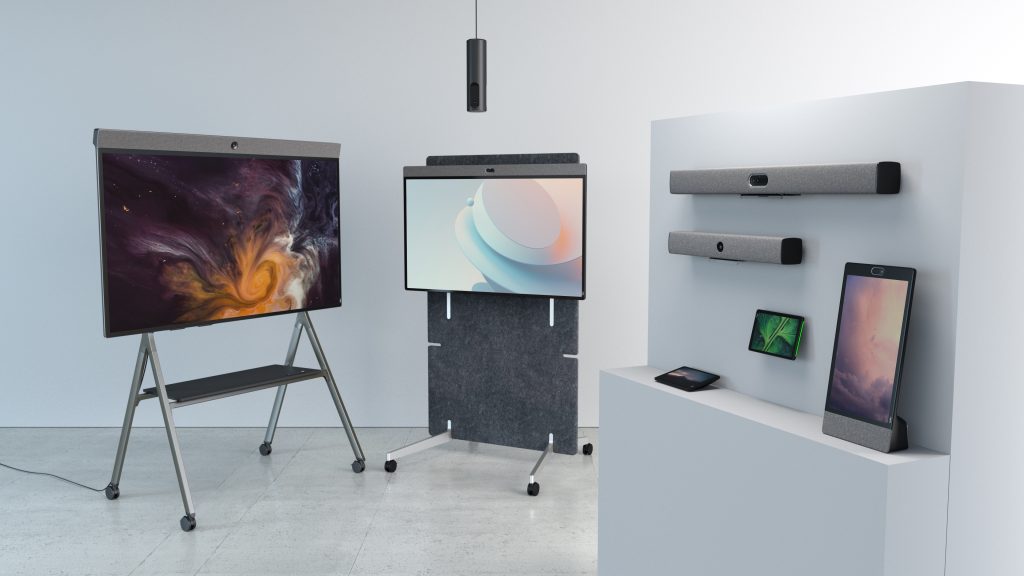
Neat focuses on simplifying video collaboration for modern hybrid workplaces through appliance-based conferencing systems designed for Zoom and Microsoft Teams environments.
Rather than relying on heavily customized AV systems, Neat combines cameras, microphones, speakers, and compute into integrated devices that reduce setup complexity and improve consistency across meeting spaces.
Neat devices are commonly used in:
- Huddle rooms
- Small and medium meeting rooms
- Executive offices
- Flexible collaboration spaces
For organizations prioritizing simplicity, scalability, and user experience, Neat fits particularly well in environments where reliable hybrid collaboration matters more than highly customized AV infrastructure.
As businesses continue moving toward AI-powered, easy-to-manage conferencing systems, the market is increasingly shifting toward solutions that employees can use immediately without extensive training or support.
Overview of Neat devices and pricing
| Product | Category | Best For | Starting Price (USD) |
| Neat Frame | Personal collaboration device | Personal desks, focus spaces, reception areas | $599 |
| Neat Bar BYOD | BYOD video bar | Small meeting spaces using laptops | $699 |
| Neat Pad | Room controller / scheduler | Meeting room control and scheduling | $990 |
| Neat Pad Pro | Premium room controller | Advanced room control and scheduling | $1,290 |
| Neat Center | Companion device | Enhanced coverage in medium and large rooms | $2,490 |
| Neat Board 32 | All-in-one touchscreen | Desks, focus rooms, small spaces | From $3,990 |
| Neat Bar Generation 2 | Video bar | Small and medium meeting rooms | $4,690 |
| Neat Board 50 | All-in-one touchscreen | Huddle rooms and small meeting rooms | From $6,390 |
| Neat Bar Pro | Video bar | Medium and large meeting rooms | $6,690 |
| Neat Board Pro | All-in-one touchscreen | Medium and large meeting rooms | From $8,490 |
Final thoughts
Video conferencing is no longer just another workplace tool. It has become core business infrastructure for hybrid collaboration.
The organizations seeing the best results in 2026 are not necessarily spending the most money. They’re investing in systems that make meetings feel simple, reliable, and effortless.
Perhaps it’s time to book a demo and experience them for yourself.
Frequently asked questions
What is the average cost of a conference room setup?
Most modern conference rooms cost between $5,000 and $30,000 depending on room size, audio requirements, and collaboration features.
What is the biggest cost in a conferencing system?
In enterprise deployments, installation, audio infrastructure, and displays are often more expensive than the conferencing device itself.
Are AI-powered meeting rooms worth it?
For organizations with frequent hybrid meetings, AI features can improve meeting quality, reduce setup friction, and lower support costs over time.
How long should conferencing hardware last?
Most organizations plan for a hardware lifecycle of three to five years, although premium systems often remain viable longer through software updates and platform integrations.
Sources
- Grand View Research — Video Conferencing Market Size, Share and Trends Analysis Report
https://www.grandviewresearch.com/industry-analysis/video-conferencing-market - Reuters — Zoom raises annual forecasts as AI features drive demand
https://www.reuters.com/business/zoom-raises-annual-forecasts-banks-ai-features-drive-demand-2026-05-21/ - Boom Collaboration — Top Conferencing Trends for 2026
https://boom.co/blog/the-top-5-conferencing-trends-for-2026 - Zoapi — The Future of Hybrid Collaboration: Key Trends for 2026
https://zoapi.com/blog/the-future-of-hybrid-collaboration-key-trends-for-2026/ - Microsoft — Microsoft Teams Rooms Documentation
https://learn.microsoft.com/en-us/microsoftteams/rooms/ - Zoom — Zoom Rooms Overview
https://explore.zoom.us/en/products/zoom-rooms/