

8 Security Best Practices for Private Video Conferencing in 2026
Hayley Spooner, Jun 16, 2026
Key takeaways
- Secure video conferencing requires a combination of encryption, identity controls, access management, and employee training.
- Multi-Factor Authentication (MFA), waiting rooms, meeting locks, and role-based permissions help prevent unauthorized access.
- Transcription powered by Artificial Intelligence (AI), recordings, and meeting summaries require clear governance and retention policies.
- Conference room devices should be managed like enterprise endpoints with centralized monitoring and updates.
- Effective security strategies balance strong protection with a simple, user-friendly meeting experience.
Private video conferencing has become essential business infrastructure. In 2026, organizations use video meetings for executive decisions, customer conversations, legal discussions, healthcare consultations, financial reviews, hiring, training, and sensitive internal collaboration.
That makes video conferencing security more important than ever. Modern meetings now include AI-powered collaboration features, real-time transcription, cloud recordings, file sharing, workspace integrations, and connected meeting room devices. These tools improve productivity, but they also create new security, privacy, and compliance risks.
The best approach is not to make video meetings difficult to join. It is to secure them in a way that protects sensitive information while keeping the meeting experience simple for employees, customers, and partners.
This guide explains the most important private video conferencing security best practices for 2026, including how to protect meetings, manage access, secure devices, and reduce risk across hybrid workplaces.
Quick answer: how do you secure private video conferencing?
The best way to secure private video conferencing is to combine strong identity controls, encrypted meetings, meeting access restrictions, approved platforms, secure room devices, employee training, and clear governance policies.
At minimum, organizations should use multi-factor authentication, waiting rooms, authenticated meeting access, meeting locks, restricted screen sharing, secure recording settings, device management, and approved enterprise conferencing platforms.
| Security priority | What it protects |
| Encryption | Meeting content and data in transit |
| Multi-Factor Authentication (MFA) and Single Sign-On (SSO) | User identities and accounts |
| Waiting rooms and meeting locks | Meeting access |
| Role-based permissions | Host controls and admin rights |
| Recording governance | Sensitive meeting data |
| Device management | Conference room hardware |
| Employee training | Human error and phishing risk |
Why video conferencing security matters more in 2026
Video conferencing is no longer just a way to talk online. It is now a central part of how organizations operate. A single meeting may include confidential business plans, customer data, legal strategy, product roadmaps, healthcare information, financial details, or personal employee information.
At the same time, the attack surface has grown. Employees join meetings from offices, homes, airports, hotels, coworking spaces, and mobile devices. Conference rooms now include smart cameras, microphones, touch controllers, cloud-connected appliances, and AI-enabled meeting tools. Each layer adds convenience, but each also needs to be secured.
AI has made this even more important. Meeting assistants can generate transcripts, summaries, action items, and searchable records. These outputs can be highly useful, but they also create new questions around storage, retention, permissions, and sensitive data exposure.
In 2026, secure video conferencing is about more than preventing unwanted meeting guests. It is about protecting meeting content before, during, and after the call.
1. Use end-to-end encryption when the meeting requires it
Encryption remains one of the most important protections for private video conferencing. Most enterprise platforms encrypt meeting data in transit, and some offer end-to-end encryption for more sensitive meetings.
End-to-end encryption is especially useful for conversations involving legal matters, board discussions, mergers and acquisitions, healthcare information, financial data, or sensitive intellectual property. Microsoft provides additional guidance on when to use end-to-end encrypted meetings for sensitive discussions. However, it can sometimes limit features such as cloud recording, live transcription, dial-in participation, or AI meeting summaries. Microsoft notes that Teams meetings are secured in transit and at rest, while end-to-end encryption can be used as an additional layer for sensitive meetings with some feature trade-offs.
Organizations should decide which meeting types require enhanced encryption and make that guidance easy for employees to follow.
| Meeting type | Recommended security level |
| General internal meeting | Standard enterprise security settings |
| Customer meeting | Authenticated access and controlled sharing |
| Executive meeting | Restricted access and limited recording |
| Legal or financial discussion | End-to-end encryption where available |
| Healthcare or regulated meeting | Encryption, access controls, and retention policies |
| Board meeting | Strong identity controls and strict recording rules |
2. Require multi-factor authentication
Passwords alone are not enough to protect video conferencing accounts. Compromised credentials remain one of the most common ways attackers gain access to business systems.
Multi-factor authentication adds another layer of verification, making it harder for unauthorized users to access meeting accounts, admin portals, recordings, or calendar integrations. MFA is especially important for administrators, executives, remote employees, external contractors, and anyone handling confidential information.
Organizations should also connect conferencing platforms to single sign-on and identity management systems. This allows IT teams to enforce conditional access policies, remove access when employees leave, and apply consistent security standards across collaboration tools.
3. Control who can join meetings
Many video conferencing security incidents begin with poor access control. Public meeting links, reused meeting IDs, forwarded invitations, and open meetings can all increase risk.
Private meetings should use waiting rooms, meeting passwords, authenticated user requirements, and invitation-only access where appropriate. Hosts should be able to remove participants, lock meetings after everyone has joined, restrict screen sharing, disable file transfers, and control who can record.
| Access control | Why it matters |
| Waiting rooms | Lets hosts approve participants before entry |
| Meeting passwords | Reduces unauthorized access |
| Authenticated access | Limits meetings to verified users |
| Meeting locks | Prevents late unwanted joins |
| Restricted screen sharing | Reduces accidental or malicious exposure |
| Host-only recording | Controls sensitive meeting data |
For recurring meetings, organizations should avoid reusing the same meeting link indefinitely for sensitive topics. New links and tighter controls reduce the risk of unauthorized access over time.
4. Standardize approved conferencing platforms
Allowing employees to use any conferencing tool they prefer creates unnecessary risk. Shadow IT makes it harder for security teams to manage settings, monitor usage, apply updates, enforce retention policies, and investigate incidents.
Standardizing approved conferencing platforms helps organizations apply consistent controls across the business. It also improves the employee experience because people know which tools to use, how to join meetings, and what security settings are expected.
Most organizations should document approved platforms for:
- Internal meetings
- Customer meetings
- Regulated conversations
- Webinars and external events
- Executive or board meetings
Enterprise platforms such as Microsoft Teams, Zoom, and Webex provide security and compliance controls that are easier to manage centrally than fragmented consumer-grade tools. The most secure platform is usually the one your organization has properly configured, monitored, and trained employees to use.
5. Secure meeting recordings, transcripts, and AI summaries
In 2026, the meeting does not end when the call ends. Recordings, transcripts, chat messages, shared files, AI summaries, and action items may all continue to exist as searchable business records.
This creates a major security and compliance consideration. A confidential conversation can be well protected during the live meeting but still create risk if the recording is stored in the wrong place, shared too broadly, retained too long, or summarized by an AI tool without appropriate controls.
Organizations should define clear rules for:
- Who can record meetings
- Where recordings are stored
- How long recordings are retained
- Who can access transcripts
- Whether AI summaries are enabled
- Which meetings should not be recorded
- How sensitive data should be handled
AI meeting tools can be valuable, but they should be governed carefully. For highly sensitive conversations, organizations may choose to disable AI summaries or transcription unless there is a clear business need and appropriate security controls.
6. Secure conference room devices and meeting hardware
Conference room devices are now part of the enterprise security environment. Modern meeting spaces often include smart cameras, microphones, collaboration displays, touch controllers, compute appliances, occupancy sensors, and cloud-connected management tools.
Every connected device should be treated as a managed endpoint. That means IT teams need visibility into device health, firmware versions, access permissions, network configuration, and update status.
Organizations should prioritize:
- Automatic firmware updates
- Centralized device management
- Secure network segmentation
- Admin access controls
- Physical device protection
- Hardware lifecycle management
- Vendor security review
This is especially important for hybrid workplaces with many meeting rooms across multiple offices. Standardized, centrally managed room systems reduce complexity and help IT teams maintain a stronger security posture.
7. Train employees on video conferencing security
Technology cannot prevent every security issue. Employees still play a major role in keeping meetings private, which is why security agencies recommend training users on secure online meeting practices.
Training should be practical and easy to follow. Employees need to know when to use waiting rooms, when to restrict screen sharing, how to avoid public meeting links, how to manage recordings, and how to recognize phishing attempts disguised as meeting invitations.
Common risks include:
- Joining sensitive meetings over public Wi-Fi
- Forwarding private meeting links
- Sharing recordings too broadly
- Allowing unknown participants into meetings
- Using unapproved conferencing tools
- Clicking fake meeting invites
Security training should be refreshed regularly, especially as AI meeting tools and collaboration platforms evolve.
8. Create a formal video conferencing security policy
Many organizations rely heavily on video meetings but do not have a clear policy for how those meetings should be secured.
A strong video conferencing security policy should define approved platforms, access requirements, recording rules, AI meeting assistant usage, data retention, external participant guidelines, device standards, and escalation procedures.
| Policy area | What to define |
| Approved platforms | Which tools employees may use |
| Meeting access | Who can join and how they are verified |
| Recording rules | When recording is allowed |
| AI tools | When transcription and summaries are permitted |
| Data retention | How long meeting data is stored |
| External guests | How customers, partners, and vendors join |
| Incident response | What to do if something goes wrong |
The policy should be simple enough for employees to follow. Overly complex rules often lead people to bypass security controls.
How AI is changing video conferencing security
AI is one of the biggest changes affecting private video conferencing in 2026. Meeting assistants can now capture conversations, summarize decisions, identify action items, translate speech, and make meeting content searchable.
These features are useful, but they also require stronger governance. Organizations need to know what data AI tools can access, whether meeting content is used for model training, where summaries are stored, and who can retrieve them later.
AI also changes the threat landscape. Phishing emails, fake meeting invitations, voice cloning, and impersonation attempts are becoming more convincing. This makes identity verification, Multi-Factor Authentication (MFA), and employee training even more important.
A good AI meeting policy should answer four questions:
- Which AI meeting tools are approved?
- What types of meetings can use AI transcription or summaries?
- Where is AI-generated meeting content stored?
- Who can access, share, or delete that content?
Video conferencing security checklist for 2026
Before rolling out or updating video conferencing systems, organizations should confirm they have:
- Multi-factor authentication enabled
- Single Sign-On (SSO) and identity controls configured
- End-to-end encryption available for sensitive meetings
- Waiting rooms and meeting locks enabled where appropriate
- Host controls for screen sharing, recording, and participant removal
- Approved conferencing platforms documented
- Recording and transcript retention rules defined
- AI meeting assistant policies established
- Conference room devices centrally managed
- Firmware and software updates automated
- Employee security training in place
- Incident response procedures documented
The strongest security strategies combine technical controls, employee awareness, and simple workflows that people can actually follow.
Where Neat fits in
Private video conferencing security is no longer only an IT concern. It is now a core part of workplace strategy, employee experience, customer trust, and business continuity.
The most effective organizations in 2026 are not simply adding more security tools. They are creating collaboration environments that are secure, easy to manage, and appropriate for the sensitivity of each meeting. A strong security strategy combines encryption, identity controls, meeting access management, device security, recording governance, AI policies, employee training, and standardized collaboration platforms.
Technology also plays an important role in maintaining a strong security posture. As organizations scale hybrid work across multiple offices, many are standardizing meeting room technology to reduce complexity, improve visibility, and simplify management. Consistent room experiences make it easier for IT teams to apply updates, enforce security policies, and support employees effectively.
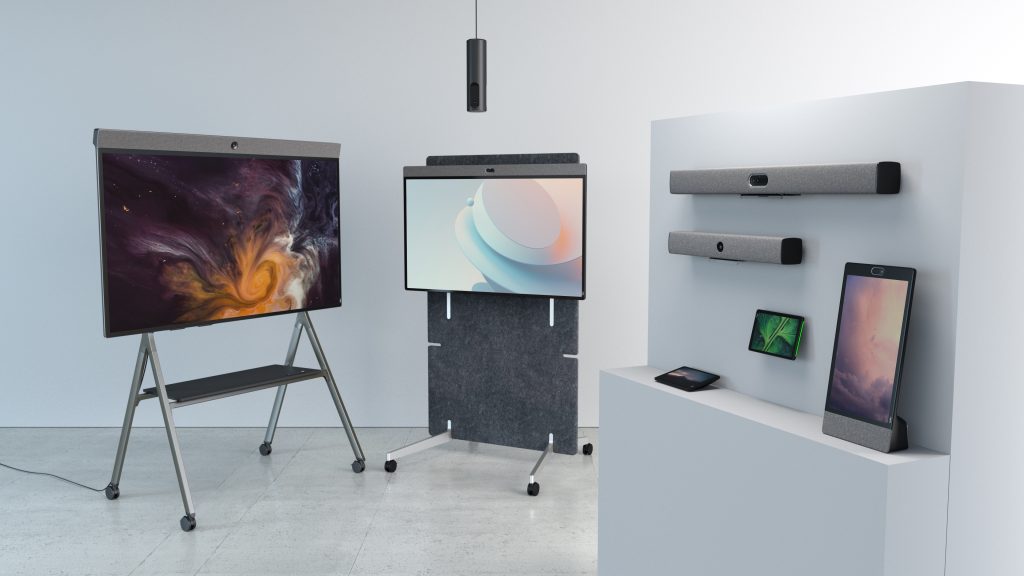
This is where solutions like Neat can help. Neat’s appliance-based video collaboration systems are designed for Zoom and Microsoft Teams environments, combining cameras, microphones, speakers, and compute into integrated devices that reduce reliance on fragmented room technology stacks. By simplifying deployment and management, Neat can help organizations improve meeting consistency while supporting enterprise security requirements and centralized device oversight.
As hybrid work continues to evolve, businesses are increasingly prioritizing collaboration environments that balance strong security with simplicity and usability. When security and user experience work together, organizations can protect sensitive conversations without slowing down collaboration or creating unnecessary friction.
Perhaps it’s time to book a demo and experience them for yourself.
Frequently asked questions
What is the most important security feature for private video conferencing?
The most important security feature is strong access control. Organizations should use MFA, authenticated meeting access, waiting rooms, and host controls to make sure only approved participants can join and interact in private meetings.
Is end-to-end encryption necessary for every video meeting?
No. End-to-end encryption is most important for highly sensitive meetings, such as legal, financial, executive, healthcare, or regulated discussions. For general business meetings, standard enterprise encryption and access controls may be sufficient.
Are AI meeting assistants secure?
AI meeting assistants can be secure when they are approved, configured, and governed properly. Organizations should review data handling, storage, retention, access permissions, and whether meeting data is used for AI model training before enabling these tools broadly.
Should companies allow employees to record meetings?
Companies should allow recording only when there is a clear business need. Recording rules should define who can record, where recordings are stored, who can access them, and how long they are retained.
How can organizations secure video conferencing hardware?
Organizations should manage conferencing devices like enterprise endpoints. That means using centralized management, automatic updates, secure network configuration, admin access controls, and approved hardware standards.
Sources
- UK National Cyber Security Centre — How to Secure Your Online Meetings
https://www.ncsc.gov.uk/guidance/how-to-secure-your-online-meetings - Microsoft — Overview of Security and Compliance in Microsoft Teams
https://learn.microsoft.com/en-us/microsoftteams/security-compliance-overview - Microsoft — Security Guide for Microsoft Teams Overview
https://learn.microsoft.com/en-us/microsoftteams/teams-security-guide - Microsoft — Require End-to-End Encryption for Sensitive Teams Meetings
https://learn.microsoft.com/en-us/microsoftteams/end-to-end-encrypted-meetings - Zoom — Zoom Security
https://www.zoom.com/en/trust/security/ - Zoom — AI Companion Security and Privacy
https://www.zoom.com/en/products/ai-assistant/resources/privacy-security/ - Reuters — Zoom Raises Annual Forecasts, Banks on AI Features to Drive Demand
https://www.reuters.com/business/zoom-raises-annual-forecasts-banks-ai-features-drive-demand-2026-05-21/