


How to Choose the Best Microphone for a Large Conference Room in 2026
Hayley Spooner, Aug 4, 2026
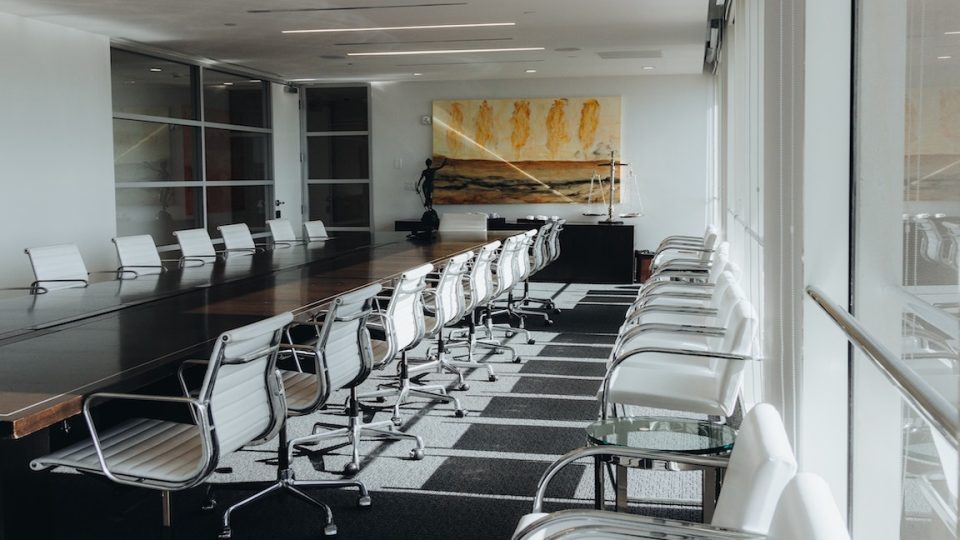
Key takeaways
- The best conference room microphone depends on room size, layout, acoustics, and how people collaborate—not just microphone specifications.
- Speech clarity is more important than simply adding more microphones.
- AI-powered microphone arrays can automatically improve voice pickup while reducing background noise and echo.
- Integrated collaboration devices often deliver a better meeting experience than standalone microphones.
- Large meeting rooms benefit from coordinated audio systems that adapt to conversations in real time.
- Better audio creates more inclusive and productive hybrid meetings.
Introduction
Clear audio is the foundation of every successful hybrid meeting.
No matter how impressive your camera or display may be, a meeting quickly becomes frustrating if participants struggle to hear one another. Poor speech pickup, background noise, echo, and inconsistent microphone coverage all reduce collaboration and make remote participants feel disconnected from the conversation.
Choosing the right microphone for a large conference room isn’t simply about buying the most expensive equipment or installing more microphones. The best solution depends on the size of the room, the way people use the space, the room’s acoustics, and how the different technologies work together.
Modern conference room audio has also evolved significantly. Rather than relying on individual microphones positioned around a table, many organizations now use intelligent microphone arrays and AI-powered audio processing that automatically optimize speech pickup while reducing unwanted noise.
This guide explains how to choose the best microphone for a large conference room, compares the different microphone options available in 2026, and highlights the technologies that help create more natural hybrid meeting experiences.
What makes a good conference room microphone?
The best conference room microphone captures every participant clearly while fading into the background of the meeting experience.
It’s no longer enough for a microphone to simply record voices.
Modern collaboration requires audio systems that adapt automatically to different room layouts, speaker positions, and meeting styles while minimizing distractions for both in-room and remote participants.
Several factors determine microphone performance.
Speech clarity
The primary goal of any conference room microphone is to make every participant easy to understand.
Clear speech allows conversations to flow naturally while reducing the need for people to repeat themselves.
In hybrid meetings, speech clarity is especially important because remote participants rely almost entirely on audio to follow the discussion.
Coverage
Large meeting rooms require consistent audio coverage across the entire space.
Microphones should capture participants wherever they’re seated rather than focusing only on people closest to the device.
The larger the room, the more important microphone placement and coverage become.
Background noise reduction
Modern workplaces are rarely silent.
Office conversations, air conditioning systems, keyboards, and other environmental sounds can interfere with meeting quality.
Intelligent audio processing helps reduce these distractions so voices remain the focus of the conversation.
Echo cancellation
Echo remains one of the most common causes of poor meeting audio.
Effective echo cancellation prevents microphones from capturing sound played through room speakers, creating more natural conversations for everyone involved.
Intelligent audio processing
Today’s best conference room microphones do much more than capture sound.
Many systems now use AI-powered technologies to identify active speakers, balance microphone levels automatically, reduce unwanted noise, and optimize speech throughout the meeting without requiring manual adjustments.
Why conference room audio has changed
Meeting room audio has evolved rapidly as organizations embrace hybrid work.
The focus has shifted from installing more equipment to creating more natural collaboration experiences.
Several trends are driving this change.
Hybrid meetings require better audio
In traditional meetings, everyone sat around the same table.
Today, participants often join from multiple offices, home workspaces, or mobile devices.
Remote attendees depend on clear, consistent audio to remain engaged throughout the discussion.
As a result, organizations are placing greater emphasis on speech quality rather than simply increasing microphone coverage.
AI is improving microphone performance
Artificial intelligence has transformed modern conference room audio.
Instead of relying solely on hardware specifications, many collaboration devices now use AI to improve speech clarity automatically.
These technologies can:
- Focus on active speakers.
- Reduce background noise.
- Suppress echo.
- Adapt microphone sensitivity.
- Balance voices across the room.
The result is clearer conversations with less manual intervention.
Integrated microphone arrays are replacing standalone microphones
Rather than deploying multiple independent microphones throughout a room, many organizations now prefer integrated collaboration devices that combine cameras, speakers, microphones, and intelligent processing into a single coordinated system.
This simplifies deployment while creating a more consistent meeting experience.
Because every component is designed to work together, integrated systems can often deliver better overall performance than separate devices from multiple manufacturers.
Speech quality matters more than microphone quantity
Adding more microphones doesn’t automatically improve meeting quality.
In fact, poorly coordinated microphone systems can sometimes introduce additional echo, inconsistent volume levels, or unnecessary background noise.
Modern collaboration systems increasingly rely on intelligent microphone coordination that determines which microphones should be active at any given moment, creating clearer and more natural conversations across larger meeting spaces.
7 factors to consider when choosing a conference room microphone
The best microphone depends on how your meeting room is used—not simply on technical specifications.
Before investing in new conference room audio, consider the following factors.
1. Room size
The size of the meeting room has the greatest influence on microphone selection.
A microphone that performs well in a small huddle room may struggle to capture voices clearly across a large boardroom.
As room size increases, organizations should consider:
- Microphone coverage.
- Distance from participants.
- Number of attendees.
- Speaker locations.
- Overall room acoustics.
Choosing equipment that’s designed for the scale of the room helps ensure consistent speech quality throughout the meeting.
2. Room layout
Two conference rooms with the same dimensions can require very different audio solutions.
Consider:
- Boardroom layouts.
- Classroom seating.
- U-shaped tables.
- Flexible collaboration spaces.
- Presentation areas.
Microphone placement should reflect how people naturally interact within the room rather than simply where furniture is located.
The goal is to ensure every participant can be heard clearly without needing to lean toward a microphone.
3. Microphone coverage
Coverage determines how effectively microphones capture voices throughout the meeting space.
Some microphones are designed to capture sound from a single direction, while others provide wide-area coverage across larger rooms.
Instead of thinking only about the number of microphones, think about how effectively the system captures every participant wherever they’re seated.
Consistent coverage creates a more natural experience for remote attendees while reducing the need for participants to raise their voices.
4. AI-powered audio processing
Modern conference room microphones increasingly rely on intelligent software as much as hardware.
AI-powered audio processing can automatically:
- Prioritize active speakers.
- Reduce background noise.
- Suppress echo.
- Balance microphone levels.
- Improve speech clarity.
- Adapt to changing conversations.
Advances in speech enhancement are helping modern collaboration systems isolate voices more effectively while reducing background noise and improving intelligibility during hybrid meetings.
Rather than requiring users to manually adjust microphone settings throughout a meeting, these technologies continuously optimize audio in the background.
As a result, meetings become more natural, more inclusive, and significantly easier to manage.
5. Consider background noise and room acoustics
Even the best microphone can’t overcome poor room acoustics.
Large conference rooms often contain hard surfaces such as glass walls, polished floors, and exposed ceilings that reflect sound. These reflections can reduce speech clarity and make conversations more difficult for remote participants to follow.
When planning your meeting space, consider:
- Carpet or rugs to absorb sound.
- Acoustic wall panels.
- Soft furnishings where appropriate.
- Ceiling treatments.
- Reducing unnecessary background noise.
Improving the room itself often delivers just as much benefit as upgrading the microphone.
6. Choose a solution that works with your collaboration platform
Your microphone should work seamlessly with the collaboration platforms your organization already uses.
Whether your teams primarily use Zoom, Microsoft Teams, or another supported platform, compatibility should extend beyond simply connecting to the meeting. The best conference room solutions integrate audio, video, and collaboration features into a single, consistent experience.
This reduces setup time, simplifies user training, and creates a more reliable meeting experience across every room.
7. Prioritize simplicity and long-term management
The most advanced microphone isn’t necessarily the best choice if it’s difficult to install, configure, or maintain.
As organizations deploy technology across multiple meeting rooms, ease of management becomes increasingly important.
Look for solutions that offer:
- Simple deployment.
- Automatic software updates.
- Remote monitoring.
- Centralized device management.
- Reliable long-term performance.
The easier a meeting room is to manage, the more consistently employees can rely on it.
Types of conference room microphones
Different meeting spaces require different microphone solutions. Understanding the strengths of each option can help you choose the right technology for your environment.
| Microphone type | Best for | Advantages | Considerations |
|---|---|---|---|
| Ceiling microphone array | Large boardrooms and training rooms | Wide room coverage, unobtrusive installation | Professional installation required |
| Boundary microphone | Medium-sized conference rooms | Easy to deploy and cost-effective | Coverage may be limited in larger spaces |
| Integrated microphone array | Most hybrid meeting rooms | AI-powered processing, simple deployment, coordinated audio | Coverage depends on room size and device placement |
| Lavalier microphone | Presenters and training sessions | Excellent individual voice pickup | Requires each presenter to wear a microphone |
| Gooseneck microphone | Formal boardrooms and council chambers | Precise speech capture | Less flexible for collaborative discussions |
While each microphone type has its place, many organizations are increasingly choosing integrated collaboration devices that combine microphones, cameras, speakers, and intelligent processing into a single system. This simplifies deployment while delivering a more consistent meeting experience.
Common mistakes when choosing conference room microphones
Avoiding these common mistakes can significantly improve meeting quality.
Buying more microphones instead of improving audio quality
Adding extra microphones doesn’t automatically create better sound.
Without intelligent coordination, multiple microphones can introduce inconsistent audio levels, background noise, or echo.
Ignoring room acoustics
Microphones perform best in rooms that have been designed with speech clarity in mind.
Addressing room acoustics often provides greater improvements than replacing audio hardware alone.
Focusing only on people in the room
Hybrid meetings should provide an excellent experience for remote participants as well as those sitting around the conference table.
Audio systems should capture every voice clearly, regardless of where participants are seated.
Overcomplicating deployment
The best meeting rooms don’t require users to think about microphones.
Technology should work automatically so participants can focus on collaboration rather than troubleshooting equipment.
Treating audio and video separately
Meeting quality depends on cameras, microphones, speakers, and software working together.
Integrated collaboration systems often deliver a better overall experience than managing multiple standalone components.
5 trends shaping conference room audio in 2026
Conference room audio continues to evolve as AI becomes more deeply integrated into workplace collaboration.
Several trends are shaping the future of meeting room sound.
1. AI-powered beamforming
Modern microphone arrays can identify active speakers and focus on their voices while reducing unwanted background sounds.
2. Intelligent microphone coordination
Rather than allowing every microphone to capture audio simultaneously, intelligent systems coordinate multiple microphones to deliver clearer, more natural conversations.
3. Software-defined audio
Increasingly, audio quality is being improved through software updates rather than hardware replacements, allowing organizations to benefit from ongoing innovation over time.
4. Better hybrid meeting experiences
Audio technology is increasingly designed around meeting equity, helping remote participants hear conversations as naturally as colleagues sitting in the room.
5. Simpler meeting rooms
Organizations are moving away from complex audio installations in favor of integrated collaboration devices that combine intelligent microphones, cameras, speakers, and AI-powered processing into a single solution.
Where Neat fits in
Choosing the right microphone is important, but great conference room audio depends on much more than the microphone itself.
Neat designs integrated collaboration devices where cameras, microphones, speakers, and AI-powered processing work together as a single coordinated system. Instead of asking users to manage individual audio components, Neat devices automatically optimize meetings behind the scenes so people can focus on the conversation.
For medium and large meeting rooms, Neat Bar Generation 2 combines adaptive microphone arrays, premium speakers, intelligent cameras, and AI-powered processing to deliver exceptional speech clarity across larger collaboration spaces.
Rather than relying on microphones operating independently, Neat Experiences use proprietary technologies such as intelligent multiple-microphone mixing to continuously determine which microphones should be prioritized throughout the meeting. This helps reduce unwanted background noise while ensuring voices remain clear as conversations move naturally around the room.
For larger spaces, Neat Center complements compatible Neat devices by capturing conversations from the center of the room, improving both visibility and voice pickup for remote participants. The result is a more balanced and inclusive hybrid meeting experience.
For interactive collaboration, Neat Board Pro combines intelligent microphones, premium audio, video conferencing, wireless content sharing, and digital whiteboarding into a single all-in-one collaboration device.
Behind every deployment, Neat Pulse allows IT teams to remotely monitor devices, deploy software updates, and manage meeting room performance across multiple offices from one centralized platform.
Together, these solutions help organizations create conference rooms where exceptional audio happens automatically, allowing technology to disappear into the background so collaboration remains the focus.
Perhaps it’s time to book a demo and experience them for yourself.
Frequently asked questions
What is the best microphone for a large conference room?
The best microphone depends on your room size, layout, acoustics, and collaboration requirements. Many organizations now choose integrated microphone arrays that combine AI-powered audio processing with cameras and speakers to create a more consistent meeting experience.
How many microphones do I need in a large conference room?
There is no single answer. The number of microphones depends on the size of the room, seating layout, and microphone coverage. Intelligent microphone arrays can often provide excellent coverage with fewer devices than traditional installations.
Are ceiling microphones better than table microphones?
Both have advantages. Ceiling microphone arrays provide wide coverage while keeping tables clear, whereas boundary microphones are easier to deploy in many existing meeting rooms.
What is a microphone array?
A microphone array uses multiple microphones working together to capture speech more accurately than a single microphone. Modern arrays often use AI to improve voice pickup and reduce background noise.
How does AI improve conference room audio?
AI can automatically identify active speakers, reduce background noise, suppress echo, balance microphone levels, and improve overall speech clarity throughout a meeting.
Why is speech clarity more important than microphone quantity?
Adding more microphones doesn’t necessarily improve audio quality. Clear speech depends on intelligent audio processing, effective microphone placement, and good room acoustics working together.
Can one microphone cover a large conference room?
In some cases, yes. Modern microphone arrays provide much wider coverage than traditional microphones, but larger rooms may still benefit from multiple coordinated microphones depending on the room layout.
Are integrated collaboration devices better than standalone microphones?
For many organizations, yes. Integrated devices simplify deployment, reduce compatibility issues, and allow microphones, cameras, speakers, and AI-powered processing to work together as a coordinated system.
Sources
- How Neat Rethought Speech Quality for Large Rooms | Neat | https://neat.no/stories/how-neat-rethought-speech-quality-for-large-rooms/
- Acoustics and Sound | Acoustical Society of America (ASA) | https://acousticalsociety.org/
- Audio Engineering Society (AES) | Audio Engineering Society | https://aes2.org/
- Speech Enhancement: Removing Background and Transmission Noise | arXiv | https://arxiv.org/abs/2301.09027
- Noise | National Institute for Occupational Safety and Health (NIOSH), Centers for Disease Control and Prevention (CDC) | https://www.cdc.gov/niosh/noise/





