


How to Eliminate Background Noise During Video Calls: The Complete Guide for 2026
Hayley Spooner, Aug 3, 2026
Key Takeaways
- Background noise is one of the biggest barriers to productive video meetings, but most issues can be prevented with the right setup.
- AI-powered noise suppression works best when combined with good room acoustics and quality microphones.
- Echo, reverberation, and microphone placement often have a greater impact on audio quality than background sounds alone.
- Small improvements to your meeting environment can significantly improve call quality.
- Purpose-built collaboration devices deliver clearer audio than relying solely on laptop microphones.
- Great meeting audio helps create more inclusive hybrid meetings where everyone can participate confidently.
Introduction
Clear audio has become just as important as high-quality video in today’s hybrid workplace.
Whether you’re joining a customer presentation from home, collaborating with colleagues across different offices, or leading a meeting in a conference room, poor audio quality can quickly interrupt the flow of conversation. Background conversations, keyboard noise, air conditioning, traffic, and room echo all make it harder for participants to hear one another clearly.
Fortunately, most background noise problems are easier to solve than many people realize.
The best approach combines thoughtful room setup, quality microphones, intelligent collaboration technology, and AI-powered audio processing that automatically removes distractions while preserving natural speech.
This guide explains what causes background noise during video calls, why clear audio matters, and the most effective ways to improve meeting quality in 2026.
What causes background noise during video calls?
Understanding the source of unwanted noise is the first step toward eliminating it.
Not every audio issue has the same cause. While people often describe every problem as “background noise,” several different factors can affect the quality of a video meeting.
Environmental noise
Environmental noise is any unwanted sound in the surrounding space.
Common examples include:
- Office conversations.
- Air conditioning systems.
- Traffic.
- Construction work.
- Home appliances.
- Barking dogs.
- Keyboard typing.
- Mobile phone notifications.
These sounds compete with the speaker’s voice, making conversations more difficult to follow.
Echo
Echo occurs when a participant hears their own voice repeated during a call.
This usually happens when microphones pick up audio coming from nearby speakers.
Although modern collaboration platforms include echo cancellation, poor room design or incorrect equipment placement can still create noticeable echo during meetings.
Reverberation
Reverberation isn’t the same as echo.
Instead of hearing a distinct repeat of your voice, reverberation causes sound to bounce repeatedly around the room before fading away.
Large rooms with hard surfaces such as glass, concrete, or exposed walls often experience higher levels of reverberation, making speech sound distant or unclear.
Adding soft furnishings or acoustic treatments can significantly improve speech clarity.
Poor microphone placement
Even high-quality microphones perform poorly if they’re positioned incorrectly.
Common problems include:
- Sitting too far from the microphone.
- Blocking the microphone.
- Using laptop microphones in large rooms.
- Positioning microphones near noisy equipment.
The closer a microphone is to the person speaking, the easier it becomes to capture clear speech while reducing unwanted background sounds.
Multiple audio sources
Joining the same meeting from multiple devices in one room can create feedback, echo, and inconsistent audio quality.
Whenever possible, use a single meeting device designed for the room rather than multiple laptops connected to the same call.
Why clear audio matters
People are far more likely to forgive average video quality than poor audio.
If participants struggle to hear the conversation, meetings quickly become tiring and less productive.
Clear audio helps teams:
- Understand each other more easily.
- Reduce misunderstandings.
- Make decisions more quickly.
- Keep meetings focused.
- Improve customer interactions.
- Create more inclusive hybrid meetings.
For remote employees, high-quality audio is especially important because they rely almost entirely on what they hear to stay engaged in discussions.
Improving audio quality also reduces listening fatigue, allowing participants to concentrate on the conversation rather than trying to interpret distorted speech.
8 ways to eliminate background noise during video calls
The most effective approach combines good meeting habits with technology that automatically improves audio quality.
1. Use AI-powered noise suppression
AI has transformed how modern meeting platforms process audio.
Rather than simply reducing microphone sensitivity, today’s AI-powered systems can distinguish between speech and unwanted sounds in real time.
Through noise suppression, modern AI audio processing can reduce:
- Keyboard typing.
- Air conditioning.
- Traffic.
- Dogs barking.
- Paper shuffling.
- Background conversations.
These technologies help meetings sound more natural without requiring participants to manually adjust audio settings throughout the call.
2. Improve your room acoustics
The room itself has a major influence on audio quality.
Even the best microphones struggle in spaces with excessive echo or reverberation.
Simple improvements can make a noticeable difference, including:
- Carpets or rugs.
- Curtains or blinds.
- Upholstered furniture.
- Acoustic wall panels.
- Bookshelves or other soft surfaces.
Reducing reflective surfaces allows microphones to capture voices more clearly while minimizing unwanted room noise.
3. Position your microphone correctly
Microphone placement has a direct impact on speech clarity.
For the best results:
- Position microphones as close to speakers as practical.
- Avoid placing microphones next to laptops with noisy cooling fans.
- Keep microphones away from speakers to reduce feedback.
- Use equipment designed for the size of the meeting space.
Purpose-built collaboration devices often use intelligent microphone arrays that automatically focus on active speakers while reducing background distractions.
4. Enable built-in noise suppression
Most major video conferencing platforms now include built-in noise suppression settings.
Before important meetings, check that these features are enabled within your preferred collaboration platform.
Many platforms offer multiple levels of background noise reduction depending on your environment.
While software-based noise suppression is highly effective, it works best when combined with good microphone placement and appropriate room acoustics rather than relying on software alone.
5. Reduce unnecessary background noise
The simplest way to improve audio quality is to eliminate noise before your microphone picks it up.
While AI-powered audio processing can remove many distractions, reducing noise at the source will always produce the best results.
Before joining a meeting:
- Silence mobile devices.
- Close unnecessary applications that generate notifications.
- Turn off televisions or music.
- Close doors and windows if outside noise is excessive.
- Choose the quietest available workspace.
If you’re working in an open office, consider moving to a designated meeting room or using a headset when privacy and background noise are concerns.
6. Choose the right equipment
The quality of your collaboration equipment has a significant impact on how clearly others hear you.
Built-in laptop microphones are designed for convenience rather than professional collaboration. They often capture more room noise because they’re farther away from the speaker and have limited audio processing capabilities.
Purpose-built collaboration devices are designed to:
- Capture voices more accurately.
- Reduce unwanted background sounds.
- Improve speech clarity.
- Automatically adapt to different meeting environments.
- Deliver a more consistent experience for remote participants.
Choosing equipment that’s appropriate for the size of your meeting space can dramatically improve both audio quality and overall meeting productivity.
7. Avoid common audio mistakes
Many audio problems are caused by simple setup issues rather than technology failures.
Some of the most common mistakes include:
- Joining the same meeting from multiple devices in one room.
- Sitting too far from the microphone.
- Positioning microphones near loud equipment.
- Speaking while muted or partially covering the microphone.
- Relying entirely on software to compensate for poor room acoustics.
Taking a few moments to check your setup before the meeting begins can prevent many of these issues.
8. Test your audio before important meetings
The best time to discover an audio problem isn’t after your meeting has started.
Most collaboration platforms allow you to test your microphone, speakers, and audio settings before joining a call.
Before important presentations or customer meetings, check:
- Microphone levels.
- Speaker volume.
- Noise suppression settings.
- Camera framing.
- Internet connection.
- Room acoustics.
A short pre-meeting check can help avoid interruptions and create a more professional experience for everyone involved.
Background noise solutions compared
Different situations require different solutions.
| Solution | Best for | Typical investment |
| AI-powered noise suppression | Home offices and everyday meetings | Low |
| Acoustic improvements | Dedicated meeting rooms | Medium |
| High-quality microphones | Personal workspaces | Medium |
| Purpose-built collaboration devices | Conference and hybrid meeting rooms | Higher |
| Built-in platform noise suppression | Quick improvements using existing software | Free |
Common mistakes that affect video call audio
Even with modern collaboration technology, small mistakes can have a noticeable impact on meeting quality.
Relying only on software
Noise suppression is highly effective, but it can’t fully compensate for poor room acoustics or incorrect microphone placement.
Using equipment designed for the wrong space
A laptop microphone may work well for a one-on-one call but struggle in a medium or large conference room.
Ignoring room acoustics
Hard surfaces reflect sound, making conversations less clear.
Simple acoustic improvements often deliver significant benefits.
Skipping audio checks
Testing your equipment before an important meeting helps identify problems before they affect other participants.
Speaking too far from the microphone
Maintaining an appropriate distance from the microphone improves voice clarity while reducing unwanted background noise.
Audio trends shaping hybrid meetings in 2026
Meeting audio continues to evolve rapidly as AI becomes more deeply integrated into collaboration technology.
AI voice isolation
Modern systems can distinguish between speech and background sounds with remarkable accuracy, allowing voices to remain clear even in busy environments.
Intelligent microphone arrays
Beamforming microphones automatically focus on active speakers while reducing sounds from elsewhere in the room.
Adaptive audio processing
Meeting devices increasingly adjust audio settings automatically based on room conditions, reducing the need for manual configuration.
Better meeting equity
Clear audio helps ensure remote participants can contribute as naturally as those physically present in the room.
Smarter workplace insights
Organizations are beginning to use device analytics and workplace insights to understand how meeting spaces perform and identify opportunities for improvement.
Where Neat fits in
Clear communication starts with technology that’s designed specifically for modern hybrid meetings.
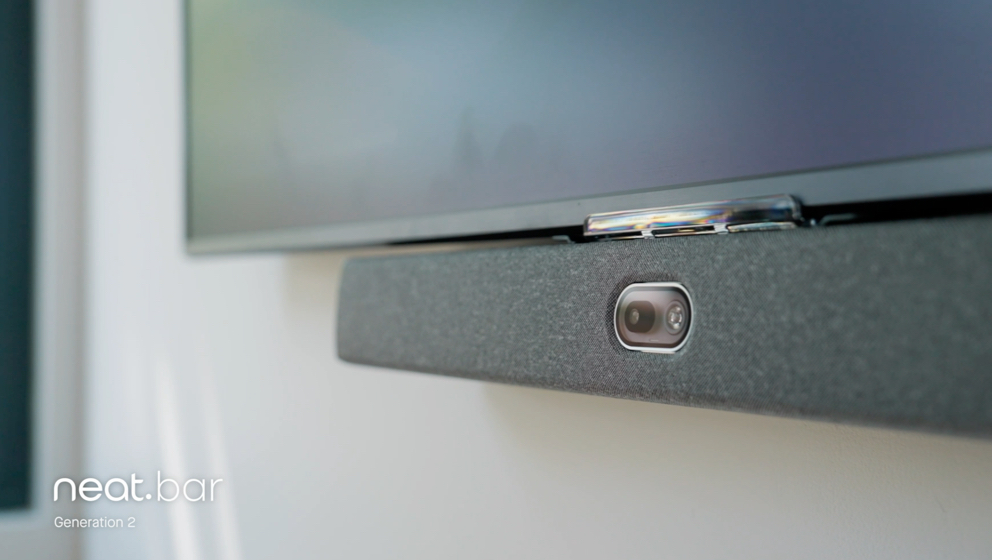
For medium and large meeting rooms, Neat Bar Generation 2 combines advanced cameras, intelligent microphone arrays, premium speakers, and AI-powered processing to deliver exceptional audio and video quality across the room.
For organizations looking to create more inclusive hybrid meetings, Neat Center extends visibility and audio coverage beyond the front of the room, helping remote participants hear conversations more naturally and stay engaged throughout the meeting.
For interactive collaboration spaces, Neat Board 50 combines video conferencing, wireless content sharing, digital whiteboarding, and premium audio in a single all-in-one device, making it easier for distributed teams to collaborate without technical distractions.
Supporting every meeting are Neat Experiences—a suite of proprietary technologies that intelligently optimize audio, video, and participant framing. Features such as advanced audio processing, echo cancellation, and adaptive microphone technology work automatically, allowing participants to focus on the conversation instead of adjusting settings.
For organizations managing multiple meeting spaces, Neat Pulse provides centralized device management, remote monitoring, and software updates to help IT teams maintain consistently high meeting quality across every room.
Together, these technologies help organizations reduce background noise, improve speech clarity, and create more natural meeting experiences for everyone, whether they’re in the room or joining remotely.
Perhaps it’s time to book a demo and experience them for yourself.
Frequently asked questions
How do I eliminate background noise during video calls?
Start by reducing noise in your environment, improving room acoustics, positioning your microphone correctly, and enabling built-in noise suppression features. Purpose-built collaboration devices with AI-powered audio processing can further improve call quality.
Why is my microphone picking up background noise?
Laptop microphones often capture sounds from the entire room. Background noise may also increase if the microphone is positioned too far away or if you’re working in a noisy environment.
Does AI noise suppression really work?
Yes. Modern AI-powered noise suppression is highly effective at reducing common sounds such as keyboard typing, traffic, and office conversations while preserving natural speech.
What’s the difference between background noise and echo?
Background noise refers to unwanted environmental sounds, while echo occurs when microphones capture audio coming from speakers. Reverberation is a separate issue caused by sound reflecting around a room.
How can I improve audio quality in a conference room?
Use equipment designed for the size of the room, improve acoustics where possible, position microphones appropriately, and choose collaboration technology with intelligent audio processing and echo cancellation.
Should I use a headset or speakerphone?
For individual calls in busy environments, a headset often provides the clearest audio. In meeting rooms, purpose-built collaboration devices generally deliver a better experience for all participants.
Can room acoustics really improve meeting quality?
Yes. Soft furnishings, acoustic panels, carpets, and curtains reduce sound reflections and improve speech clarity, making conversations easier to follow.
Why is clear audio important in hybrid meetings?
Clear audio helps everyone hear and participate naturally, reduces listening fatigue, minimizes misunderstandings, and creates a more equitable experience for remote participants.
Sources
- Acoustics and Sound | Acoustical Society of America (ASA) | https://acousticalsociety.org/
- Speech Enhancement: Removing Background and Transmission Noise | arXiv | https://arxiv.org/abs/2301.09027
- Noise | National Institute for Occupational Safety and Health (NIOSH), Centers for Disease Control and Prevention (CDC) | https://www.cdc.gov/niosh/noise/
- Audio Engineering Society (AES) | Audio Engineering Society | https://aes2.org/
- Speech and Hearing Information | National Institute on Deafness and Other Communication Disorders (NIDCD) | https://www.nidcd.nih.gov/





